Samsung is rolling out Gallery syncing with Google storage. The free quota is shared with Gmail, Drive and Photos.
Key points
- Samsung announced a Gallery sync with Google storage on November 10, 2026. It starts on select Galaxy devices running One UI 9; availability also depends on the market.
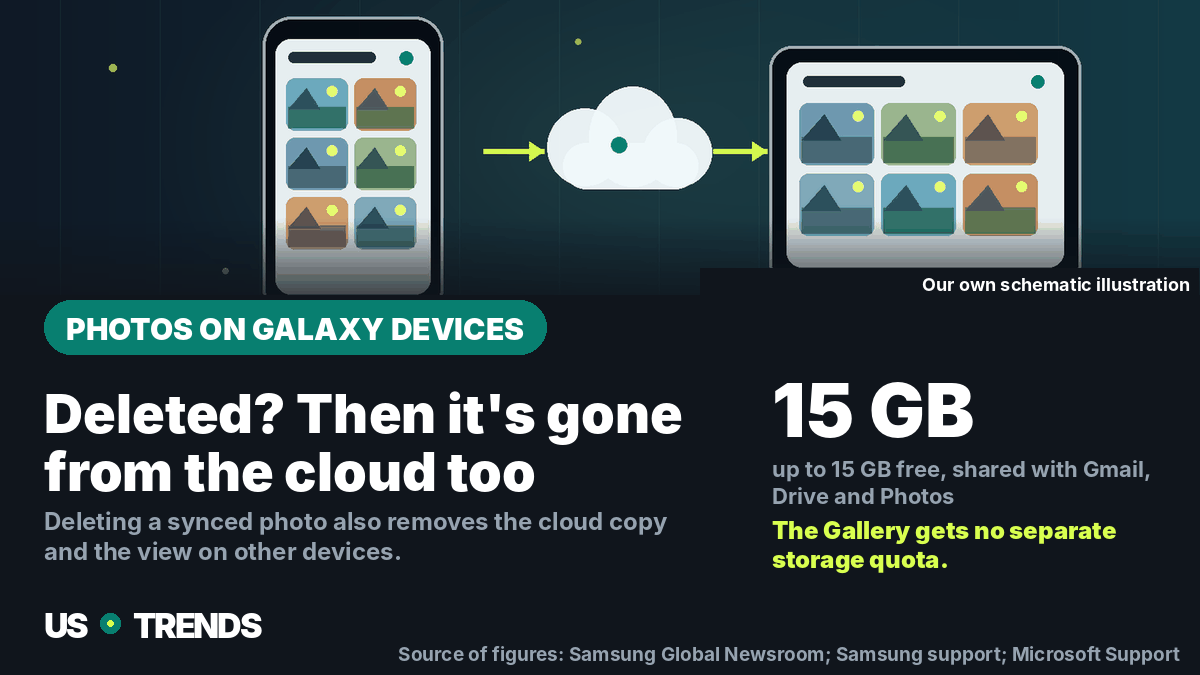
- Up to 15 GB of free Google storage is shared between Gmail, Google Drive, Google Photos and the Gallery app.
- The previous direct sync between Samsung Gallery and Microsoft OneDrive ended on September 30, 2026. Photos already stored in OneDrive remain accessible there.
- Deleting a synced photo in Samsung Gallery also removes it from the linked Google storage and from any other connected Galaxy device, Samsung says.
Samsung is rolling out a new sync between its Gallery app and Google storage. It can make photos and videos available across supported Galaxy phones and tablets and show thumbnails when setting up a new device. The global announcement doesn’t confirm a full US rollout: Samsung names select One UI 9 devices, a staged expansion, and availability that varies by market and model. Anyone turning on the feature should also understand the shared Google storage quota and what happens when a file gets deleted.
What Samsung just announced
On November 10, 2026, Samsung introduced a Gallery sync with Google storage. According to the Samsung Global Newsroom, support starts on select Galaxy devices running One UI 9 and is set to expand to more models in stages. Samsung doesn’t list a full set of eligible devices or a fixed date for every market in the announcement, and notes that availability can differ by market and model.
Owners of a supported device can turn on the sync in the Gallery app via the cloud icon, a prompt card, or the Gallery settings, Samsung says. Both a Samsung account and a Google account need to be set up on the device. No extra cloud app or new account is required, per Samsung’s description. On additional Galaxy devices, the same accounts need to be signed in and syncing switched on there too.
The feature is also meant to ease moving to a new device: after signing in on a new Galaxy device, thumbnails of synced photos and videos can show up without the entire collection downloading right away. Anyone who needs the original file can pull it down individually, Samsung says. That’s useful when on-device storage is limited or when a large photo library shouldn’t be fully copied onto every device.
The new feature doesn’t mean existing images from every Google service automatically show up in the Samsung Gallery. Samsung initially limits visible content to photos and videos backed up through Gallery sync after it’s turned on. Files already sitting in Google storage beforehand don’t automatically appear in the Gallery, per the announcement.
How much storage is actually free
Samsung cites up to 15 GB of free storage per Google account. That quota is shared with Gmail, Google Drive and Google Photos. The Gallery doesn’t get its own extra allowance. How much is left over for new photos depends on how much space the other services already use.
That can affect whether the sync is usable without upgrading to a paid plan. Anyone with lots of emails carrying large attachments, files in Drive, or photos already in Google Photos may find considerably less than 15 GB free. Samsung points to paid Google One plans for more storage but names neither a special price nor an extra storage bonus for Gallery users in the announcement.
It’s worth checking the Google account’s storage overview before switching the feature on. What matters isn’t the total size shown, but the portion still free. Anyone considering a paid plan should also check whether a Google One subscription already exists and which account it’s tied to. Samsung notes that, where a Google One subscription already exists, its linked account should be the one selected for Gallery sync.
What happened to OneDrive syncing
The new Google feature follows the end of the direct link between Samsung Gallery and Microsoft OneDrive. Samsung had announced the end of that link for September 30, 2026. According to Samsung’s support page, photos and videos stored via OneDrive no longer show up in the Gallery app after that date. They aren’t lost as a result and remain viewable and downloadable through the OneDrive app or website.
Microsoft also confirms that the direct Gallery sync has ended. Files in the OneDrive account stay separately accessible; what’s affected is the connection to the Samsung Gallery, not the cloud storage itself. For future backups, Samsung recommends options including camera backup in the OneDrive app or Google Photos.
The new Google sync is therefore not an automatic migration of an existing OneDrive library. Samsung’s announcement gives no indication that old OneDrive photos get transferred into the new Google account. Anyone who wants to keep seeing those pictures in the Gallery on their device may need to download them from OneDrive or set up another sync available for their device. Before switching, it’s worth checking where the originals are actually stored.
Why deleting and freeing up space aren’t the same
Particular care is needed when deleting. Samsung explains that deleting a synced photo or video in the Gallery app also removes the entry from the linked Google storage and from other Galaxy devices where the same accounts are set up. An image meant to disappear only from on-device storage shouldn’t simply be removed via the normal delete function.
For that purpose, Samsung describes a separate feature called “Free up space.” After syncing, it’s meant to remove the original files from the device while thumbnails stay visible in the Gallery. The originals then remain in Google storage. Before freeing up space, it should be clear that the files have actually synced and sit in the right Google account. For especially important shots, an extra copy on a computer or separate storage device is a sensible safeguard.
The distinction matters: “Free up space” is meant to remove local originals while keeping the cloud copy. “Delete” removes a synced item from the cloud and from other connected devices too, per Samsung. Anyone using a collection across several devices should first try the feature on a file they can spare and read the confirmation dialog carefully.
How to check before switching
Galaxy owners can work through a few points before setting this up:
- Check One UI version and availability: Samsung names select One UI 9 devices and a staggered rollout. If the option is missing from Gallery settings, that’s not evidence of a fault; the device or market may not be enabled yet.
- Pick the right account: Check which Google account the Gallery connects to. With multiple accounts, the wrong storage could otherwise get used.
- Check free storage: Gmail, Drive and Google Photos share the free quota with the Gallery. Check what’s left before uploading large video libraries.
- Back up OneDrive content separately: Photos previously synced between Samsung Gallery and OneDrive stay in OneDrive. Download important originals there or check the backup in the OneDrive app.
- Check status before cleaning up: Only use “Free up space” once syncing has finished. Don’t use the normal delete function as a substitute for removing local copies.
Samsung’s global announcement names no US-specific device list or US launch date. Anyone expecting a concrete rollout should therefore check the Gallery settings and the official notes for their own model instead of assuming a single, uniform start date.
Frequently asked questions
Is the new Samsung Gallery sync already available in the US?
Samsung names a start on select Galaxy devices with One UI 9 and a staged rollout. Per the company, availability differs by market and device model. The announcement from November 10, 2026, doesn’t give a complete US device list or a fixed US launch date.
Do existing OneDrive photos move into Samsung Gallery automatically?
Samsung hasn’t announced an automatic move from OneDrive. The direct sync with OneDrive ended on September 30, 2026. Files already stored there remain accessible in OneDrive and can be downloaded from there.
How much free storage is available for the Gallery?
Google accounts include up to 15 GB of free storage, per Samsung. It’s shared by Gmail, Google Drive, Google Photos and the Gallery. How much is actually free depends on existing usage.
What happens if I delete a synced photo?
Per Samsung, deleting a synced photo in the Gallery app also removes it from the linked Google storage and from other connected Galaxy devices. The separate “Free up space” feature is meant for removing the local original file instead.
Do I need a new account or an extra app?
No. Samsung describes the feature within the existing Gallery app. A Samsung account and a Google account need to be set up, with the same accounts used on every device involved. Samsung says no separate cloud account is required.
Sources and status
- Samsung Global Newsroom: Samsung Gallery Makes It Easier to Access Photos and Videos Across Galaxy Devices, published November 10, 2026.
- Samsung support page (in German), last updated July 8, 2026.
- Microsoft Support: Using Samsung Gallery with OneDrive, accessed November 11, 2026.
Research and data as of: November 11, 2026.
Transparency note: AI-assisted tools were used in researching, structuring and writing this article. The sources used are listed in the article. Publication takes place only after manual editorial approval.
Share this article