Pictory Fails in Our Test: AI Video Editor for Reels, Shorts and Captions – Expensive, Frustrating, and Barely Usable in Practice
Pictory (app.pictory.ai / pictory.ai) positions itself as an AI-powered video editor designed to automatically generate summaries, short clips, subtitles and “social-ready” formats such as Instagram Reels, TikTok videos and YouTube Shorts from uploaded video files. That is precisely why one would choose a tool like this: upload, transcription, auto-cut, captions, export in 9:16 – done.
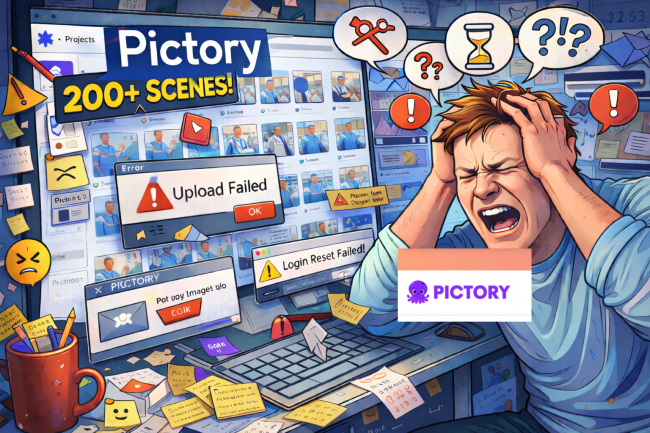


In real-world use, however, Pictory proved to be anything but a productivity tool in our test. Instead, it turned into a time-consuming obstacle, marked by UI/UX failures, contradictory modes, unstable core functions and systemic workflow breakdowns. What makes this particularly bitter: in our case, Pictory was also the most expensive tool tested.
NETZ-TRENDS.de Verdict: A Full-Blown Disaster
In the NETZ-TRENDS.de test, Pictory (pictory.ai) proved to be a severely malfunctioning AI video tool. Unstable uploads, massive issues with scene logic, and an overall contradictory user experience made productive work practically impossible. In this condition, the tool is not recommendable. With an annual fee of over €300, the dominant impression is simple: wasted time and wasted money. Overall rating: poor.
Price Comparison (Annual, Based on My Subscriptions): Pictory Is the Most Expensive – and the Worst
Here is the basic economic context, because it matters. A premium price is only defensible if the product delivers premium reliability. It does not.
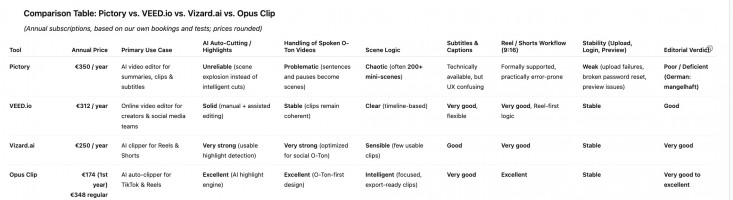
Annual pricing (based on my bookings):
Pictory: €350 / year. VEED.io: €312 / year. Vizard.ai: €250 / year. Opus Clip: €174 in the first year (regularly €348 / year). If a product carries the highest price tag in this market segment, it must deliver one thing above all else: smooth workflows. That is exactly where Pictory collapses.
What Pictory Is Supposed to Do – and Why It Fails in Real Social Workflows
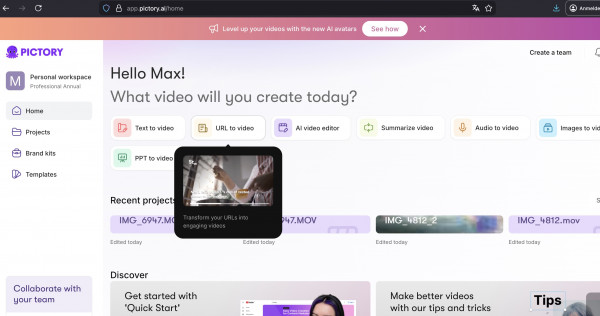
Pictory wants to be an “all-in-one” system: upload video, detect speakers, generate a transcript, create a summary clip, refine it in the Customize / AI Editor, apply text styles and branding. In theory, this is the exact workflow used by communications teams and creators producing Reels every day: insert raw footage, let AI cut it, add captions, export, finished.
My test shows the opposite. Pictory is not built Reel-first. It is built like a confusing construction kit that does not properly explain its own modes and states, and repeatedly traps users in dead ends. Anyone producing content in a high-pressure communications workflow, especially in professional environments such as clinics, will lose hours here.
Upload Problems That Already Destroy the Tool at the Starting Line
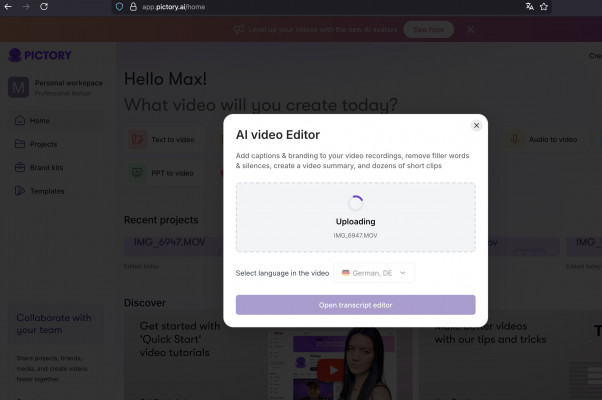
A video AI tool that cannot reliably accept uploads is already dead at its core. In my case, this happened repeatedly. Yesterday, I could not upload a video for hours. This morning, the same. On other days, uploads worked again without any clear explanation. That is not a “one-off glitch.” It is a structural sign of unreliable core infrastructure.
What makes this even worse is a separate category of failure that simply must not occur in a paid tool: the password reset did not work for days. For days, no reset mail arrived. Only after contacting customer support did I receive a manual reset link. This is not merely inconvenient. It is a fundamental availability and process failure. A tool that leaves paying users stuck in a broken login/reset flow is not trustworthy in daily professional use.
The Biggest UX Failure: Pictory Shows Things It Does Not Explain
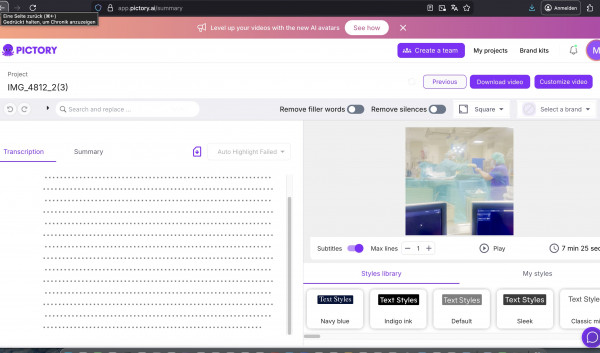
The screenshots document a chain of moments in which Pictory creates the impression that the user is “almost done,” while in reality the user is stuck in the wrong mode.
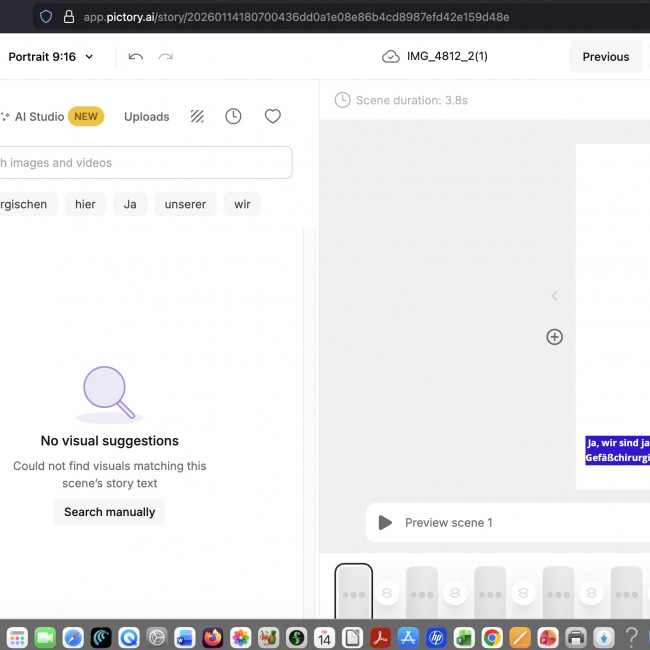
Example 1: The Half-Black Vertical Video
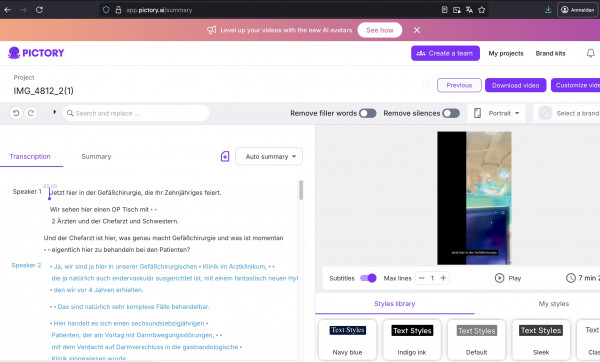
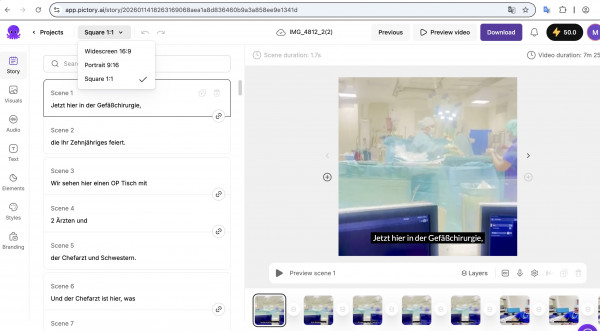
Even though the original footage is clearly recorded in a vertical format and Pictory repeatedly offers “Portrait,” the clip initially appeared half black. The cause was not the video file. The cause was the system. Pictory distinguishes between the project format, the “Summary” view, and the “Customize” editor, and those layers behave inconsistently. The user clicks “Portrait,” expects a 9:16 canvas, but still gets black space because the clip is stuck in a mode that does not provide proper full-frame scaling and instead “fits” the video inside a frame.
Example 2: The Play Button and Preview Logic
In several situations, it looked like the video could not be played—even though it had already been transcribed. The reason is Pictory’s UX logic: “Preview scene” does not preview the video. It previews a micro-scene. If you do not already know this, you assume the tool is broken. That is not user incompetence. That is bad product design.
Example 3: Visuals Without Uploads
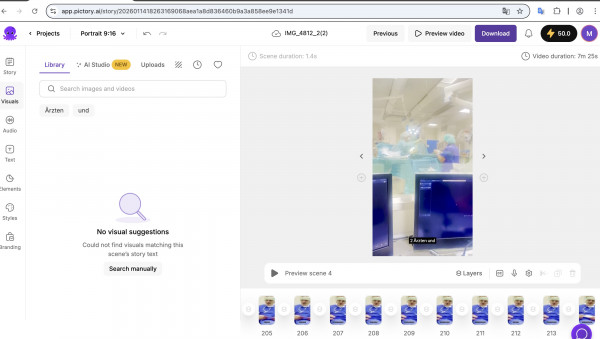
One of the most absurd moments: in “Customize,” the workspace is white, the video is missing, and under “Visuals” it says “No visual suggestions.” That only makes sense if you already learned that “Library” refers to stock assets and “Uploads” refers to your own files—yet even there, the tool did not reliably show what was available. The interface creates a constant feeling: “I’m wrong—but the tool won’t tell me why.”
The “Auto-Scene” Catastrophe: Turning One Reel into 200+ Mini Scenes
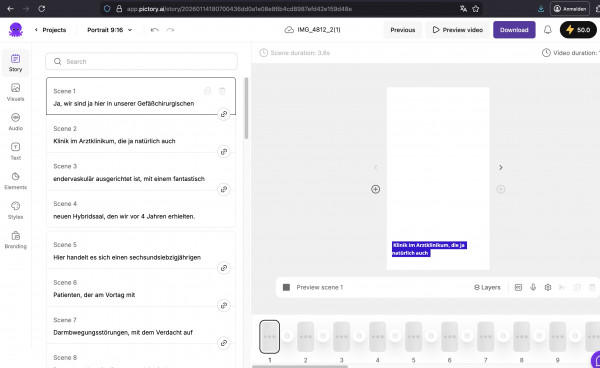
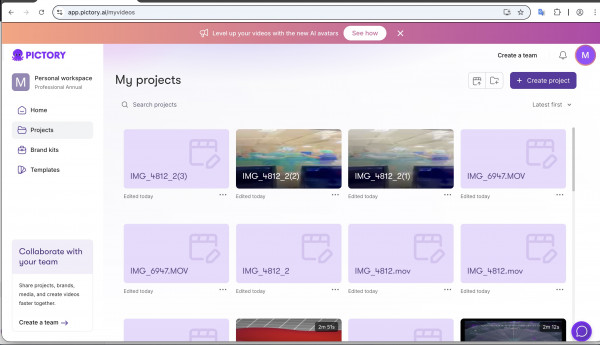
The most damaging issue in my test was Pictory’s automatic fragmentation of footage into countless mini scenes. In one case, it created more than 200 scenes. That is the point where the tool becomes effectively unusable.
Why? Because the entire point of an AI editor in this context is to transform longer footage into either a meaningful summary or a small number of strong clips. Pictory often seems to apply a crude logic closer to “sentence = scene” or “pause = scene.” The result is sequences of 1–3 seconds that add no editorial or storytelling value. This is not intelligent editing. It is automated shredding.
And then comes the next problem: once you suddenly have 218 scenes, the classic “delete everything except Scene 1” advice is not a real option. That is an editorial nightmare. This is where it becomes obvious that Pictory either has no viable concept for social O-Ton workflows—or it failed to separate “text-to-video templates” from real-world video editing.
Format Chaos: 9:16 Is Not a Simple Setting if It Depends on the Mode
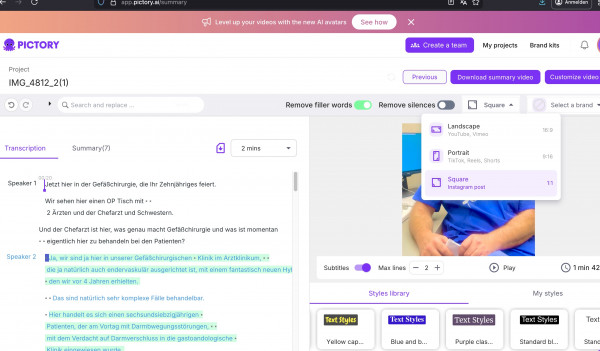
A social video tool must be crystal clear about formats: 9:16 for Reels/TikTok, 1:1 for feed posts, 16:9 for YouTube. Pictory offers these choices, but in practice it often feels as if the format is not enforced consistently across the project. Instead, it behaves differently depending on which mode you are stuck in.
In my workflow, this caused repeated delays. First, the video was half black. Then I had to change the project format. Then it stayed stuck in the wrong mode. Then it finally worked. The fact that it can be fixed does not redeem the experience. The path is a case study in how not to design a format switch. A format selector must not be “interpretive.” It must be deterministic.
The Biggest Contradiction: “Summary” Promises Cutting, “Customize” Delivers Chaos
Pictory generates two user expectations through its own naming: “Summary video” sounds like automatic shortening. “Customize video” sounds like manual refinement. In my test, the outcome was essentially inverted. The Summary flow suggested a shortened intent but blocked crucial steps. The Customize flow delivered the scene explosion and preview confusion.
An AI product that cannot reliably deliver on the core promise—cutting and clipping—fails its purpose. When you add unstable uploads and broken password reset processes on top, the result is not “rough around the edges.” It is not production-ready.
Comparison: Why VEED.io, Vizard.ai, and Opus Clip Work Much Better Day-to-Day
Without turning this into a PR statement: the difference between Pictory and VEED.io, Vizard.ai, and Opus Clip is not cosmetic. It is structural. Those tools are clearly optimized for social workflows: clearer onboarding, reliable uploads, predictable output, fewer mode traps. If a tool promises Reels and Shorts, it must deliver one key thing: a small number of usable results you can export quickly. That low-friction promise was not met by Pictory in my test.
And again: Pictory is not cheaper. It was the most expensive tool in my case. A premium price demands premium stability. Pictory delivered premium frustration.
Pictory in the USA: Hype, High Prices, and Structural Problems in Practice
At first glance, Pictory.ai may look like a practical AI video tool. At the same time, it is a textbook example of the dark side of the current AI hype: polished marketing narratives collide with technical limits, opaque subscription logic, and rising frustration among paying users. A closer look suggests that behind the polished surface there are structural issues in reliability, support, and customer handling—findings that align with many external reviews.
Overpromising, Underperforming
Pictory markets the idea that it can create “professional” videos quickly from text or footage. In practice, this is often only partially true. Independent reviews repeatedly criticize that the AI selects irrelevant or unsuitable stock visuals, producing results that look unprofessional and require manual fixes. That undermines the product’s core selling point: saving time through automation.
Technical Weaknesses in Everyday Use
Multiple reports describe performance issues: slow preview loading, stuttering, bugs, unstable downloads. What is presented as a smooth workflow can become a drag where small changes require 30 seconds or more before a preview is ready. For professional teams with deadlines, that is not an annoyance—it is a workflow killer. In my case, uploads sometimes failed entirely for hours on multiple days. For a paid SaaS tool, that is disqualifying.
Weak Voiceovers and Limited Control
Criticism also targets the voiceovers: limited selection, insufficient control over emphasis and pacing, mispronunciations—especially with names and technical terms. For educational or brand-sensitive content, this makes Pictory a risky choice. Anyone needing professional output will often rely on external audio tools, giving up the promised automation benefit.
Support, Billing, and Trust Issues
Most alarming are recurring complaints about support and billing: slow or absent replies, missing real contact persons, subscription problems, and billing disputes. Some users describe continued charges after cancellation or paid accounts marked as “expired,” including in the context of marketed lifetime deals. Experiences like this damage trust in a SaaS product dependent on ongoing payments and long-term customer relationships. These external reports align with my own experience: a broken password reset that only worked after manual support intervention.
US Origin and a European User Perspective
Pictory is a privately held US software startup headquartered in Bothell, Washington (USA). Being US-based is not a “fault” by itself—but it becomes relevant when product issues, support deficits, and legal distance come together. For European users, this often means weaker practical leverage in disputes, less transparency, and greater dependence on the company’s goodwill—especially on refunds, account access, or billing conflicts.
Balancing Hype and Responsibility
Overall, Pictory illustrates a typical gap between marketing narrative and real-world reliability. It may be usable for very simple social snippets, but it falls far short of the promise of a professional AI video studio. Anyone using it should understand the documented limitations—from weak AI choices and voiceover problems to support and billing risks—and treat it as an auxiliary tool, not the backbone of a workflow.
Founding and Company Background (As Listed in Company Profiles)
Pictory was founded in 2019 and has positioned itself as a specialized software provider for AI video creation since then. Company profiles list the founders as Vikram Chalana, Vishal Chalana, and Abid Mohammed, who previously worked together in the software and technology sector.
Headquarters: City and Country
Company profiles list the headquarters of Pictory Corp as Bothell, Washington, United States (USA). Bothell is part of the greater Seattle area, a major North American tech cluster.
Ownership Structure
Pictory is described as a privately held, non-public software company. It is listed as backed by investors, meaning equity is typically split between founders and institutional or private investors.
Source reference (company profile): ZoomInfo (Pictory Corp). https://www.zoominfo.com/c/pictory-corp/55741581
Final Conclusion: A Productivity Risk – and a Clear No
Pictory is not merely weak in its current form. It is dangerous for productivity because it pushes users into mode loops, UX dead ends, and scene avalanches. Professionals with deadlines cannot afford this. Upload instability, broken password reset processes, and an editing logic that turns one O-Ton clip into hundreds of micro-scenes are not minor issues. They are disqualifiers.
If one absolutely wants to find something positive, it is this: when Pictory works, it can generate subtitles and offers export formats. But that is not enough to justify a tool that markets itself as an AI editor for social short-form and then fails at the most basic expectations.
My recommendation after this test is straightforward: if you want to produce Reels efficiently, you are much better off with VEED.io, Vizard.ai, or Opus Clip. Pictory, in my test, was the rare tool that does not make you ask “what can I optimize?” after hours of work, but only: “Why did I pay money for this?”
Evidence of the Pictory Chaos in the NETZ-TRENDS Test
Beliebteste News

Milliardenpotenzial im Schmuckkästchen: Warum sich der Blick in die Schublade lohnt

ZDF am Abgrund: Das rote Kartell vom Lerchenberg, „Beobachter“-Phantome und der Schutzschirm für KI-Fake-News-Journalistin Nicola Albrecht
Wenn die Vorratskäufe enden: Amazons CEO warnt vor Preisschock durch US-Zölle