Three outages in three days at host Fritz Managed IT: what running a WordPress site taught us about storage limits, backups, firewalls and bots
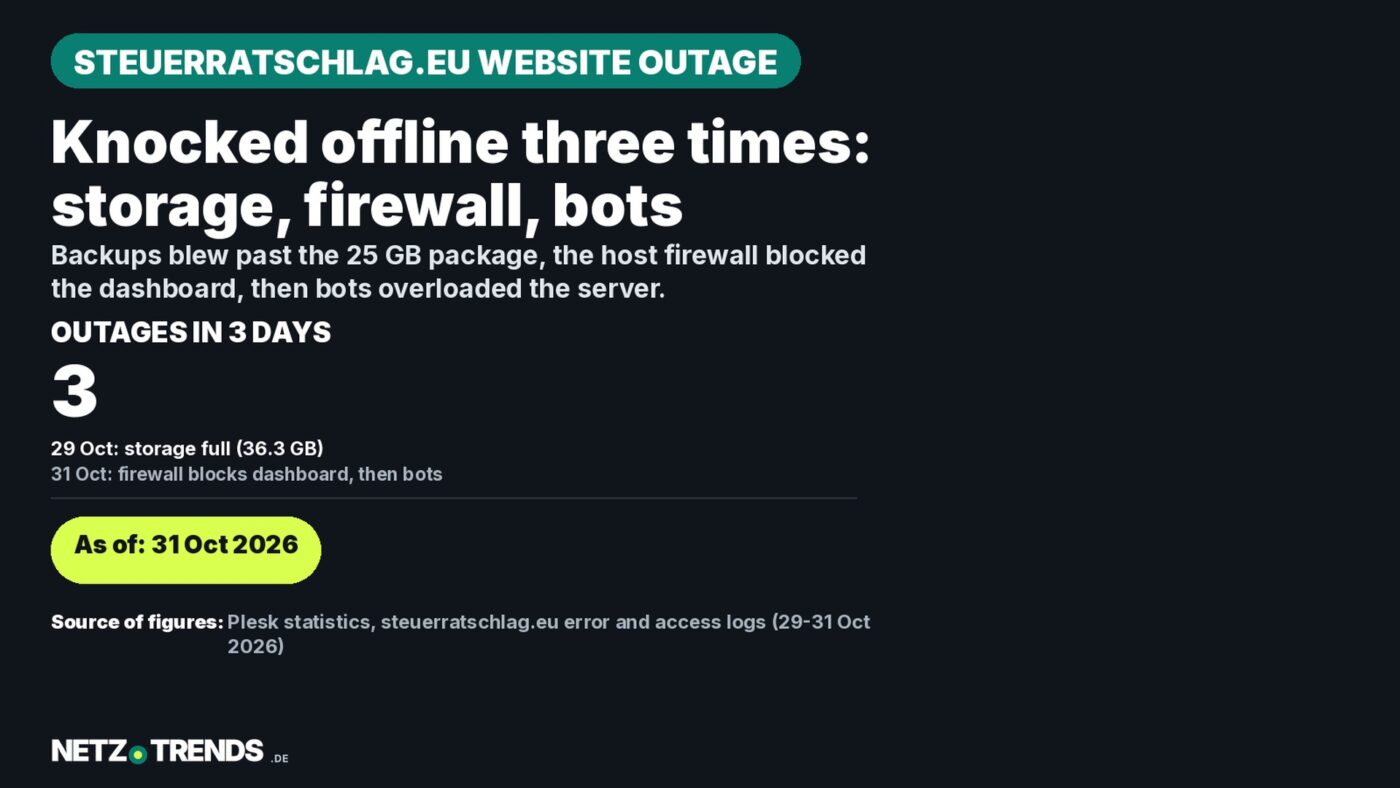
- On 29 October 2026 the hosting software locked the finance portal steuerratschlag.eu: it used 36.3 GB while the package allowed 25 GB. The cause was old backups – one archive alone was 17.2 GB.
- On 31 October 2026 every login to the WordPress dashboard ended in “Internal Server Error”: the host’s ModSecurity firewall was cutting off pages larger than 1 MB, after an analytics plugin had bloated the dashboard.
- An AI assistant found the cause in the error log; once the plugin was switched off, logins worked again.
- Also on 31 October 2026, the site went down intermittently again: bots from data-centre networks were hitting it more than ten times a second in places. Blocking eleven networks in the server’s .htaccess file ended the overload.
The financial portal steuerratschlag.eu was unusable three times within three days. Twice, protective mechanisms at host Fritz Managed IT kicked in – triggered by clutter on the site itself. The third time, bots overloaded the server.
First the site was completely offline, then there was no access to the WordPress backend, and finally it buckled under automated mass requests. Disclosure: steuerratschlag.eu belongs to the same publisher as NETZ-TRENDS, Dr K. Korosides. We are covering the case because it is typical of many small WordPress sites hosted in Germany – and because the error messages barely reveal what is actually going on.
Outage 1: storage 142 percent full
Late in the evening of 29 October 2026, steuerratschlag.eu returned nothing but a “503 Service Unavailable” error. Static files such as robots.txt still loaded; WordPress itself no longer did. In the Plesk control panel, the subscription showed as “Suspended”.
Plesk is a web-server management interface, a “control panel”. Through it, in a browser, you manage what would otherwise require server commands: creating domains and mailboxes, uploading, renaming or deleting files in a file manager, managing databases, backups and security certificates, and reading the web server’s logs. A “subscription” in Plesk is a booked hosting package with fixed limits, for example on storage space.
Why hosts need something like this
A host often runs hundreds of different customers’ websites on one server. Those customers must not get system administration access to the whole server (root access), but should be able to manage their own area without calling support for every small thing. A control panel cleanly separates customer areas, enforces the booked limits and automates routine work: setting up new packages, renewing certificates, installing security updates. Building such software in-house only pays off for large providers. Smaller hosts therefore buy licences from Plesk or its rival cPanel. There are also free, open-source alternatives such as ISPConfig or Froxlor, which require more technical know-how to run.
How widespread Plesk is
According to statistics service W3Techs (as of 1 November 2026), Plesk runs on 41.4 percent of websites where the control panel can be detected from the outside. Only hPanel, the in-house panel of large host Hostinger, is more common at 54.2 percent; cPanel stands at 1.8 percent. The bigger the website, the more common Plesk gets: among the 1,000 most-visited websites with a detectable panel, its share is 84.6 percent. On most websites the panel cannot be detected at all, however – so the figures describe only part of the market. Plesk runs on both Linux and Windows servers.
Who is behind it
Plesk originated around 1999/2000 in Novosibirsk, Russia, and later belonged to, among others, SWsoft and Parallels. Today it is developed by Plesk International GmbH, based in Schaffhausen, Switzerland. It belongs to the WebPros group of companies, which also includes cPanel; the majority owner of WebPros has been the financial investor CVC Capital Partners since 2020 (company history).
✔ What speaks for Plesk
- Operation entirely in the browser, no command-line knowledge required.
- Many tools in one package, including a WordPress Toolkit for updates and backups.
- Built-in protective features such as the ModSecurity web firewall and automatic IP blocking after suspicious access – exactly the mechanisms that kicked in at steuerratschlag.eu.
- An emergency route to the files when WordPress itself refuses to respond: the offending plugin could be switched off via the file manager even though the backend was unreachable.
✘ What is criticised about Plesk
- Rising licence prices: according to an analysis by industry publication webhosting.today, list prices rose by roughly 50 to 60 percent between 2020 and 2024, depending on the package. Host IONOS introduced a £5-a-month Plesk fee for virtual-server customers in 2025, citing significantly higher licence costs (The Register). These costs ultimately land on site operators.
- Limited competition: Plesk and cPanel, the two best-known licensed panels, belong to the same corporate group.
- Security flaws: large software running on many servers is an attractive target. In 2012, attackers exploited a vulnerability in older Plesk versions, reportedly affecting around 50,000 domains.
- Opaque errors: the protective features trigger automatically but often do not say why. At steuerratschlag.eu, the lock, the firewall cut-off and the IP block all showed only uninformative error pages – the cause only appeared in the logs.
For steuerratschlag.eu, Plesk was the decisive tool in all three outages: that is where storage use and the error and access logs were recorded.
The cause showed up in Plesk: the site was using 36.3 GB, logged as 35.4 GB of web space in the statistics – 142 percent of the 25 GB allowance in the “Web Starter” package. Plesk can automatically suspend a subscription when it exceeds its limit – a standard feature of the software, configured by the host for its packages.
Storage was almost entirely taken up by backup copies: a full backup made by the Plesk “WP Toolkit” on 28 October, at 17.2 GB, plus backups from the UpdraftPlus plugin dating from 2020 and 2026 totalling more than 11 GB. After cleaning up on 30 October, the site used only 4.3 GB, around 17 percent of the allowance.
Outage 2: firewall blocks the dashboard
Two days later, on 31 October, the site loaded normally again for visitors. Logging in to the WordPress backend, however, failed: after clicking “Log in”, a bare “Internal Server Error” page appeared, telling the user to contact the administrator at “root@localhost” – a standard Apache web-server message that explains nothing.
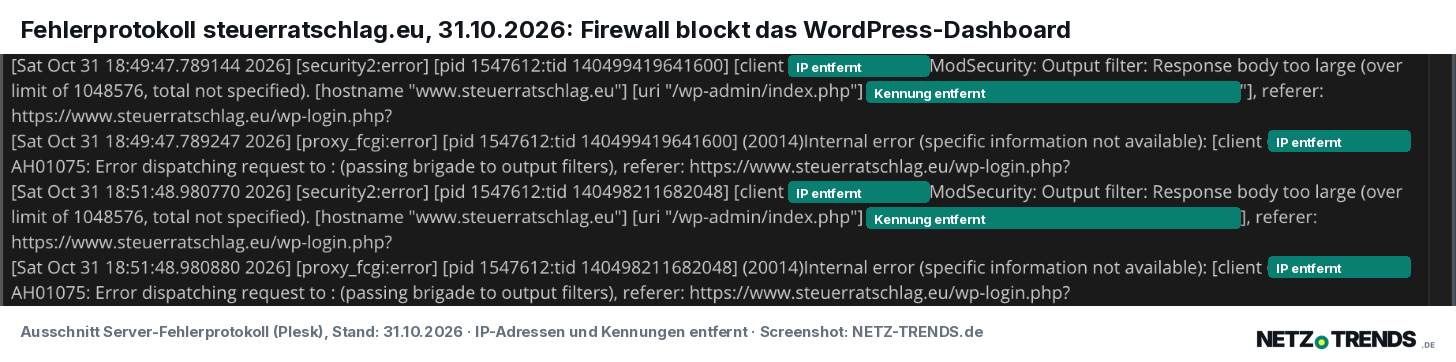
The cause appeared in the server’s error log. The login itself worked. Only when the dashboard loaded did the ModSecurity web firewall, running on the server with a ruleset from provider Comodo, kick in. It reported “Response body too large (over limit of 1048576)”: the page exceeded 1 MB, and the firewall cut it off.
The dashboard had been bloated by the Query Monitor plugin. It is a developer tool that attaches database queries, PHP errors and other diagnostic data to every backend page. For logged-in admins, it appends a large analysis panel to every backend page, listing all database queries, hooks (extension points) and scripts. On a site with many plugins, like steuerratschlag.eu, that easily exceeds the 1 MB limit. Ordinary visitors never see this panel, which is why the website itself kept working normally while the dashboard did not. According to the file date, Query Monitor had been installed or updated on 27 October 2026, two days before the problems started.
The diagnosis was not certain at first. The other suspects were ruled out: the must-use plugins folder (mu-plugins, extensions WordPress always loads automatically) held only three small, harmless files, and nothing else stood out in the plugins folder either. Whether Query Monitor was actually active could not be checked directly: the database was unavailable in Plesk, and Plesk’s WordPress Toolkit would not open.
The plugin was switched off without backend access: Claude renamed the “query-monitor” folder to “query-monitor_deaktiviert” in Plesk’s file manager. If WordPress can no longer find a plugin’s folder, it deactivates that plugin immediately – and the step can be undone at any time by restoring the original name. WordPress may briefly show a notice afterwards that the plugin was deactivated because the file does not exist; that is normal. In case the login remained stuck, Jetpack and Site Kit were next on the list of suspects. That was not needed: after the rename, logging in worked again immediately. In everyday use, Query Monitor is not needed and stays off.
The ModSecurity sample configuration actually sets a limit of just 512 KB – so the steuerratschlag.eu server allows double that. For pages over the limit, the sample configuration recommends letting the rest through unchecked (“ProcessPartial”), so legitimate pages are not broken. On the steuerratschlag.eu server, according to the log, exceeding the limit instead led to the request being cut off.
The cause was found by Claude, the AI assistant made by the US company Anthropic that the editorial team works with. It first checked whether the site was reachable from outside, then recommended testing over a different connection, and finally read the error log in Plesk. That is where the decisive entry was.
During troubleshooting, Plesk repeatedly redirected to its login page – an address that at first glance looks suspiciously long. It can be read, though: at the front is the host’s own server name, followed by “:8443”, the usual port for Plesk administration, then “login_up.php”, Plesk’s login page. The long remainder after “success_redirect_url=” only tells Plesk where to forward the user after login, for example into the file manager for a particular folder. What matters is simply that the address bar shows exactly the host’s own server name – otherwise it could be a fake page trying to capture login credentials.
Outage 3: bots overload the server
On the afternoon of 31 October 2026, steuerratschlag.eu again became intermittently unreachable; a 500 error page appeared from time to time, and the WordPress backend responded extremely slowly. The obvious suspicion: storage filling up again. Claude therefore worked through the typical locations for leftover files in Plesk’s file manager, folder by folder. The WordPress-backups folder and the Plesk recycle bin were empty; the “wp-snapshots” folder held only an empty subfolder from 2016, and the backup-plugin BackWPup’s folder held three tiny files totalling under 1 KB.
The used storage space sits almost entirely in images dating back to 2014 that are linked in articles and therefore have to stay. Only 23 inactive themes (design templates), at around 70 MB, and six inactive plugins would free up any further space. That is not necessary with a 25 GB allowance – and it had nothing to do with the third outage.
The cause showed up in the server’s access logs in Plesk: the site was being hammered by bots, automated programs, in places with more than ten page requests per second. Two groups stood out:
- Scraper bots (programs that harvest content in bulk): hundreds of IP addresses worked through old tag pages (/tag/…), for example on building societies or tax fraud at Société Générale. The addresses came from a handful of data-centre networks.
- Servers from Amazon’s network: dozens of machines repeatedly requested the same new articles and images, in some cases several times per second.
Every one of these requests forces WordPress to rebuild the page from the database. On a small hosting package, that load is enough to bring the server down.
The fix: Claude blocked eleven conspicuous data-centre networks in the .htaccess file, the Apache web server’s control file. The entry sits as a marked “bot block” section at the very top of the file and can be removed again at any time. Genuine readers and the Google search engine are unaffected. Since 5:15 pm, the blocked bots no longer appear in the log. The homepage, login and tag pages have loaded in one to three seconds ever since.
IP blocks: protection with side effects
For the publisher, a third annoyance came on top: by his account, his own internet connection was locked out by the server twice within a week. The site then stopped loading over his own line, while it remained reachable from other connections. Only via a VPN (virtual private network), which routes traffic through a different server, could he reach the backend again.
Such automatic blocks are common on hosting servers and exist for good reasons: they fend off attacks on login pages, where bots try thousands of passwords in bulk. Fritz Managed IT states in its customer portal that it uses behaviour-based detection, antivirus protection and a round-the-clock security team. Anyone who enters the wrong login details themselves several times can, however, fall victim to these same protections – and then has to request release from support, which, according to the customer portal, is reachable Monday to Friday, 9 am to 5 pm.
On 31 October, too, the publisher was caught out again: while steuerratschlag.eu loaded normally again from outside, requests from his browser failed immediately, while netz-trends.de, hosted elsewhere, stayed reachable. The most likely explanation: the host’s firewall had blocked his IP address after the day’s many requests – from repeatedly reloading the backend and the checks made during troubleshooting. Such blocks often resolve themselves after 15 to 60 minutes; otherwise, a release from support helps.
What can be learned from this
- Never leave backups sitting permanently on the same web space – store them externally and keep only a few copies.
- Check storage use regularly in the hosting interface, not only once it gets locked.
- Only switch on developer plugins such as Query Monitor for troubleshooting, then deactivate them again.
- With an “Internal Server Error”, read the server’s error log first – that is where the cause is, not on the error page.
- Check access logs regularly for conspicuous bots, and block data-centre networks that are flooding the site via .htaccess.
- Switch off a suspect plugin without backend access: rename its folder in the host’s file manager – reverse it by renaming it back.
- If you suspect an IP block, test the site over mobile data or another connection and report your IP address to support.
All three outages have since been fixed. That is not without consequences for a news portal, though: as long as the site is down, traffic and advertising revenue are lost.
Frequently asked questions
What does “503 Service Unavailable” mean?
The server is reachable but currently cannot deliver the page. At steuerratschlag.eu, this was due to the automatic lock triggered by exceeding the storage allowance.
What does “Internal Server Error” mean?
Error 500 means something went wrong while the page was being generated. In steuerratschlag.eu’s case, the ModSecurity firewall cut off delivery because the dashboard exceeded 1 MB.
Do you have to delete Query Monitor?
No. It is enough to activate the plugin only when needed. In everyday use it is not required.
How can you tell if bots are overloading a site?
In the server’s access log: many requests per second from a small number of data-centre networks, often targeting old tag or archive pages, are a typical sign. Normal readers never request several pages per second.
Sources and status
- Plesk statistics, file manager, and the steuerratschlag.eu server’s access and error logs, 29 to 31 October 2026 (own analysis)
- ModSecurity, recommended configuration (modsecurity.conf-recommended)
- Query Monitor in the WordPress plugin directory
- Fritz Managed IT, customer-portal information (as of 31 October 2026, in German)
- Plesk – manufacturer site and Wikipedia entry on Plesk (accessed 1 November 2026)
- W3Techs: web-panel market shares (as of 1 November 2026)
- webhosting.today: Plesk licence price trends, 2017–2024
- The Register: IONOS introduces a Plesk fee (2 October 2025)
Research and data as of 31 October 2026.
Transparency note: AI-assisted tools were used in researching, structuring and writing this article. The sources used are listed in the article. Publication takes place only after manual editorial approval. Translation of the German original on NETZ-TRENDS.de.