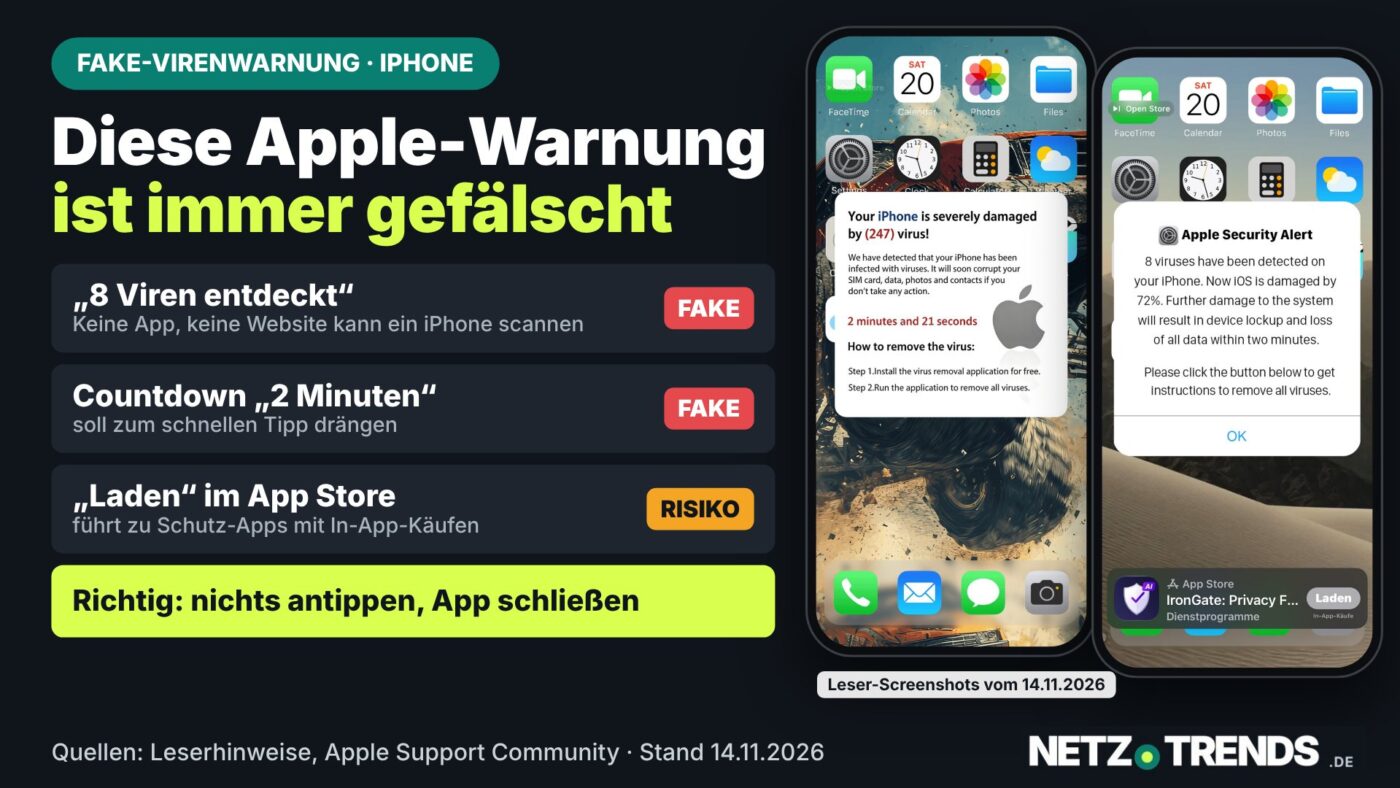
Pop-ups claiming your iPhone has viruses are always fake – the UK consumer group Which? found hundreds impersonating McAfee and Norton.
What Net Trends readers saw in Grindr
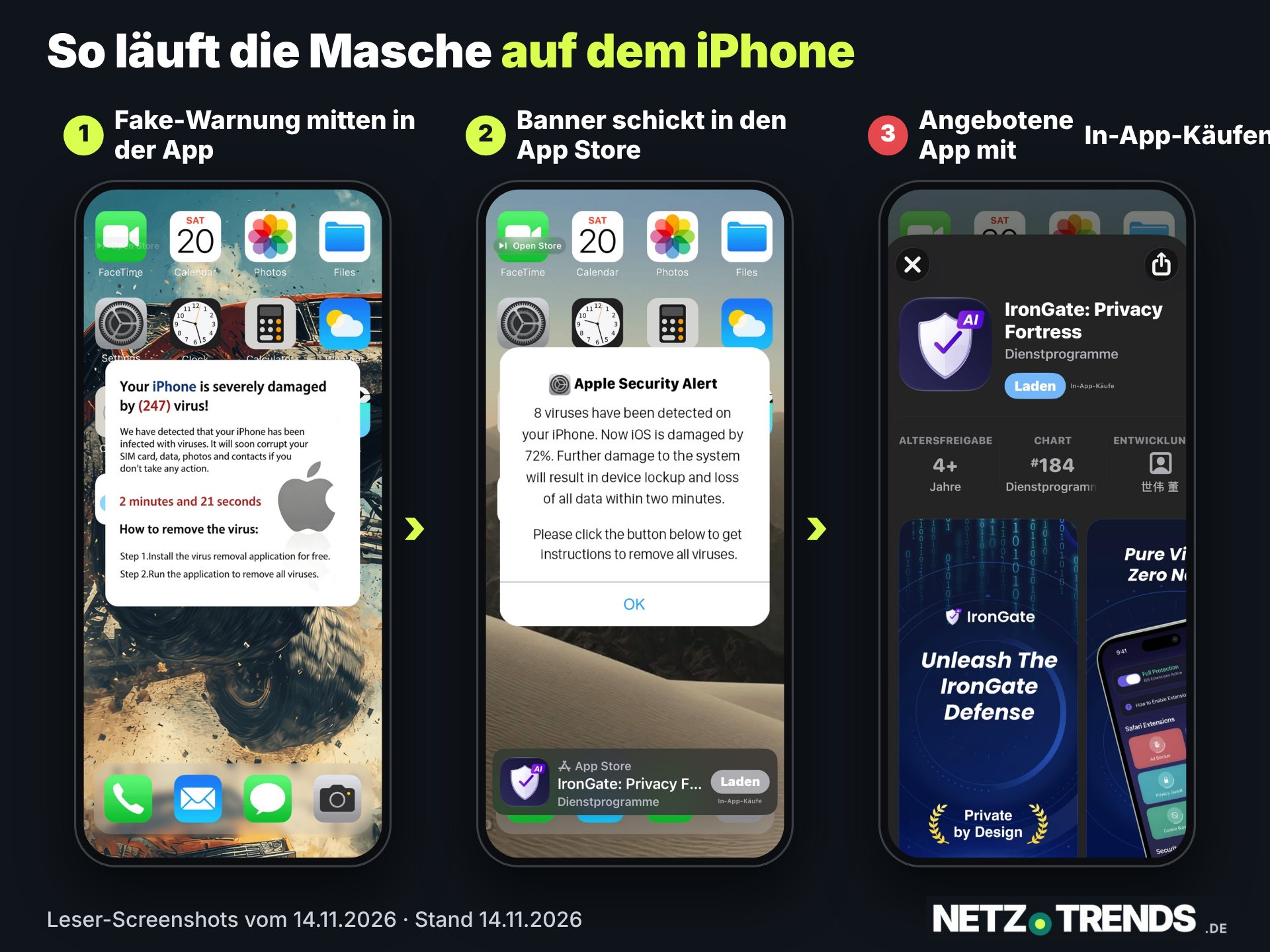
On 14 November 2026, readers of our German edition sent screenshots of fake Apple security alerts appearing inside Grindr on iPhone. One showed a countdown and claimed that eight viruses had been found. The screenshots show a prompt leading to an App Store listing for an app with in-app purchases. The alert itself provides no evidence of an infection.
Grindr’s free tier shows ads from partners. A misleading ad can make its way into an ordinary ad slot, a practice called malvertising. The screenshots do not identify which ad network served it. Close the affected app without tapping the alert. If you entered your Apple Account password, change it through Apple directly. If you paid, contact your card issuer or bank.
Key points
- A pop-up saying “your iPhone has 8 viruses” is always fake. No website can scan an iPhone for viruses.
- UK consumer group Which? found hundreds of these “scareware” pop-ups impersonating McAfee and Norton.
- Researchers at security firm Netskope tracked over 250 similar Google Ads campaigns between 31 August and 14 September 2026, reaching more than 619 organisations worldwide.
- Genuine scams can be reported to Report Fraud (reportfraud.police.uk), the UK’s national fraud and cybercrime reporting service.
A pop-up claims your iPhone is infected with eight viruses and will be damaged within two minutes. The message is always fake – no website can technically scan an Apple device.
The pattern is always the same: a bright warning with a fake Apple logo, a countdown, and a button promising to “remove all viruses”. Anyone who sees it is in no danger from the message itself – but the trick behind it, known as malvertising, reaches millions of users worldwide across very different apps and websites.
Where the pop-up really comes from
According to security researchers, this is malvertising: a website or an in-app advert banner redirects – usually without a click of your own – to a fraudulent page that mimics an official Apple warning. The US cybersecurity firm Netskope documented more than 250 Google Ads campaigns spreading such fake alerts between 31 August and 14 September 2026, affecting over 619 organisations.
What this means for users in the UK
Which?, the UK’s own consumer-testing organisation, has separately documented hundreds of scareware pop-ups circulating in the UK that impersonate well-known antivirus brands such as McAfee and Norton. Which? advises that these pop-ups can safely be ignored and should never be tapped – the “start scan” button typically leads to malware downloads or phishing pages.
How to get rid of the pop-up
On an iPhone, swipe up to close the browser in the app switcher, then clear the browsing data for that site in Settings and block notifications from it. On Android, run a Google Play Protect scan. On a Windows PC, open Task Manager (Ctrl + Alt + Delete) and end the browser process; on a Mac, use Force Quit (Option + Command + Esc).
Reporting a scam
Genuine financial loss or a scam attempt in the UK can be reported via Report Fraud at reportfraud.police.uk, or by phone on 101 for callers in Scotland. Anyone who has lost money should contact their bank immediately using the number on the back of their card.
Frequently asked questions
Can a website really detect viruses on my iPhone?
No. iOS does not allow any website to scan the device. Every such pop-up is fake, regardless of what it claims to have found.
What happens if I tap the pop-up?
Usually either an expensive subscription trap or a phishing page opens – never a real virus removal tool.
Where can I report this in the UK?
Via Report Fraud at reportfraud.police.uk, or by calling 101 if you are in Scotland.
Sources and status: Netskope Threat Labs research, August-September 2026; Apple Support Community; Which?, “Scareware: dodgy pop-ups are trying to get you to follow malicious links” (which.co.uk). As of: 14 November 2026.
Transparency note: AI-assisted tools were used in researching, structuring and writing this article. The sources used are listed in the article. Publication takes place only after manual editorial approval. Country edition based on an article from Net Trends, researched for the UK.
Share this article

Kommentieren Sag uns deine Meinung →